
1、Main features
Utilizes the BLHeli_S fixed-wing optimized algorithm, powered by the high-performance EFM8BB21F16G MCU, with high-speed throttle response.
Automatically detects the throttle signal upon power-up and is compatible with standard throttle modes using 1–2 ms pulse width input, with a built-in safety anti-stall mechanism.
Throughthe synergistic combination of ESC control algorithms, optimized PCB circuitry, and demagnetization compensation technology, motor operation is smooth and precise.
Featuring multiple protections including temperatureprotection, low RPM power protection, and safe start protection etc.
Equipped with a high-efficiency 5V BEC module, which provides stable 5V BEC Output to the receiver and servos.
Supports both PWM and Dshot300 protocols. It is widely compatible with RadioLink A560, SU27, D460 and fixed-wing models from other brands.
Adjustable motor timing. Adapts to variousmotors.
2、Specifications
Weight: 7.4g (0.26oz)
Dimension: 40*16mm (15.75″*6.3″)
Input Voltage: 6.0V to 8.7V (2S battery)
Output Voltage: Equal to input voltage
Continuous Current: 15A
Peak Current: 20A (10 seconds)
BEC Output Voltage: 5V
BEC Output Current: 2A
Supported Models: Fixed-wing
Motor Timing: The default timing angle is medium (15°), with adjustable timing angles of 0°, 7.5°, 15°, 22.5°, and 30°
Protocol: PWM, Dshot300
MCU: EFM8BB21F16G
ESC Firmware: E_H_30_REV16_7.HEX
Configuration Software: BLHeliSuite.exe
Type: Brushless, sensorless
3、Wiring diagram
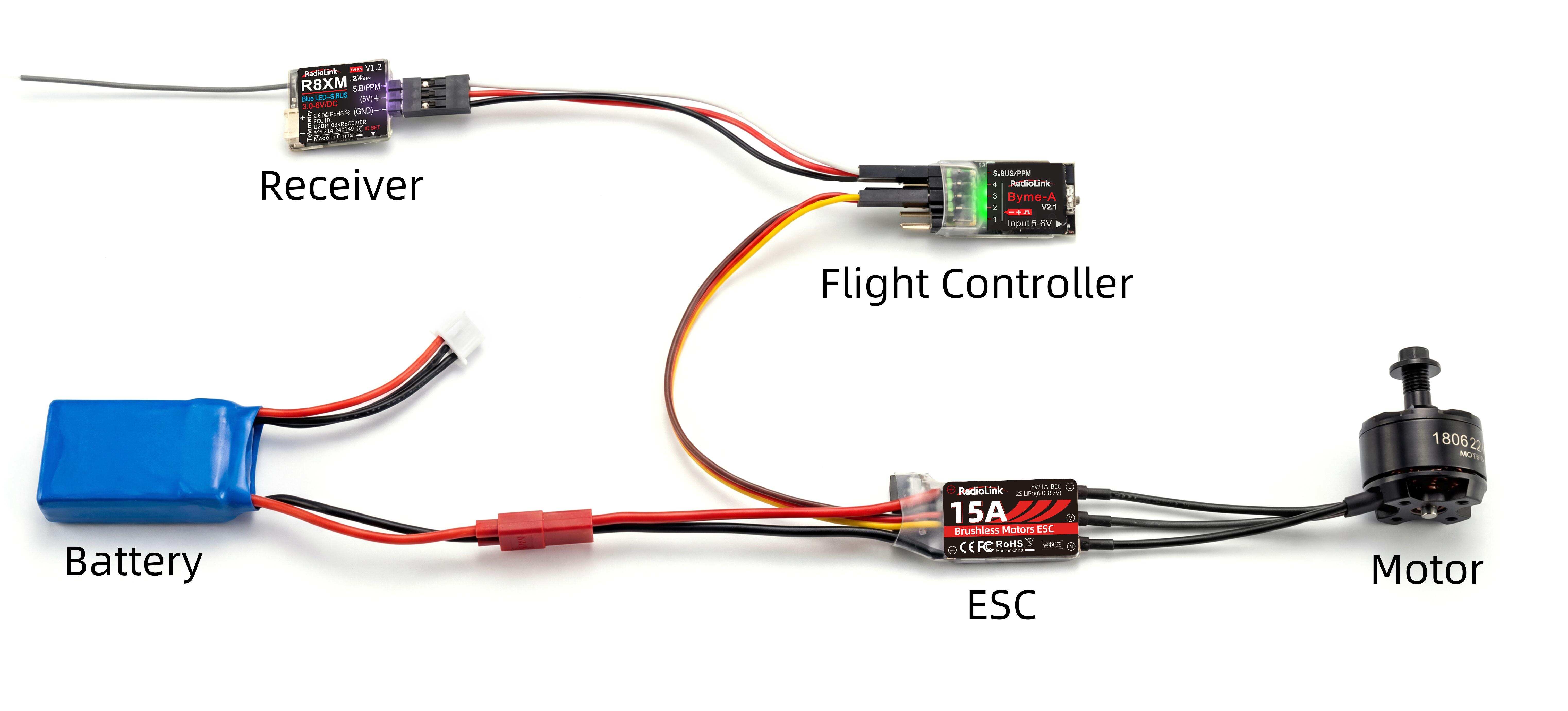
4、Operation instruction
Normal operation:
Turn on the transmitter. Move the throttle stick to the bottom position.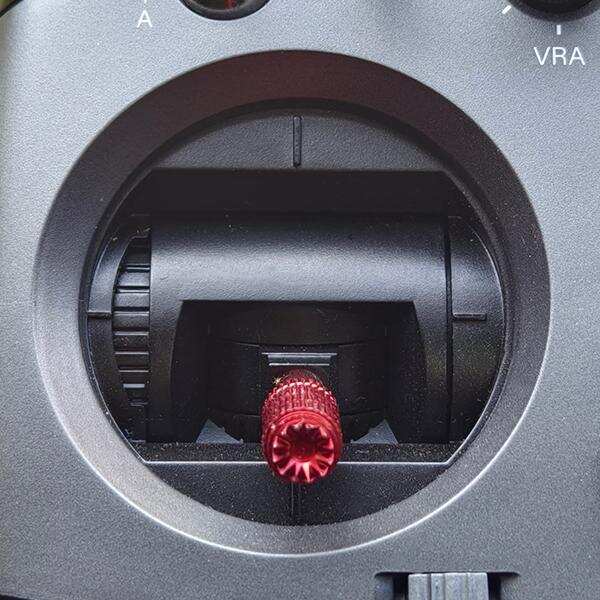
Make sure the ESC, receiver, and motor are correctly connected. Connect ESC with the battery. Three consecutive beeps from the motor indicate the ESC is powered on.
Two consecutive beeps from the motor (low and high) indicate the ESC is ready for working.
Throttle calibration:
Turn on the transmitter. Move the throttle stick to the top position.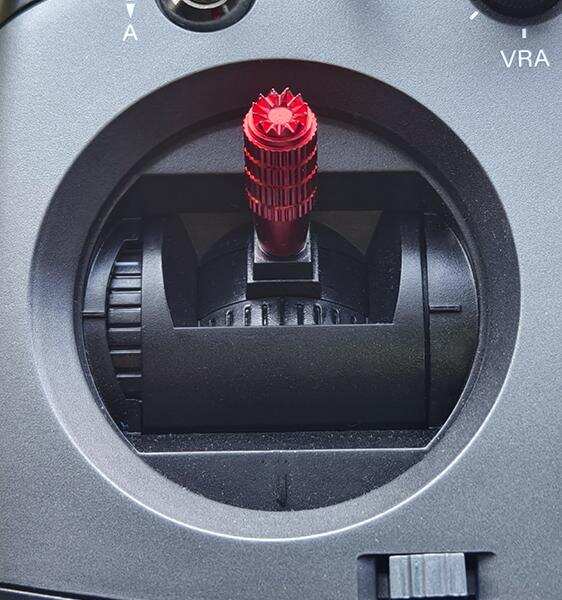
Make sure the ESC, receiver, and motor are correctly connected. Connect ESC with the battery. Three consecutive beeps from the motor indicate the ESC is powered on.
One beep from the motor indicates the full throttle position is memorized.
Move the throttle stick to the bottom position. One beep from the motor indicates the zero throttle position is memorized.
Throttle calibration is complete. The ESC is ready for working.
5、Programming parameter
Programming parameters below can be accessed from the configuration software (BLHeliSuite.exe).
The downlink of the configuration software (BLHeliSuite.exe) :
https://www.mediafire.com/folder/dx6kfaasyo24l/BLHeliSuite
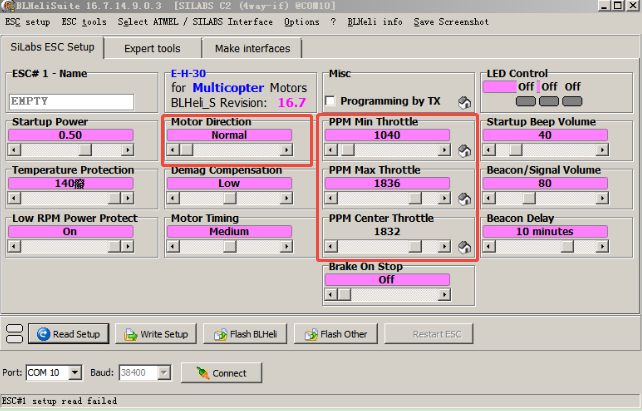
The image above shows the options supported by RE15A ESC. The boxed area contains the options that need to be set during the initial connection. Other options can be left at their default settings if not required. Below are the functions and parameter settings for each option:
(1)Startup Power: The maximum power allowed during startup. The actual power used depends on the throttle input. Starting power also affects bidirectional operation, as it limits the power applied in reverse. For low-speed motors, the maximum power is limited. To facilitate voltage detection of low back EMF, the maximum allowable power can be set by this parameter. Simply put, the higher the value, the higher the startup speed. A default value of 0.5 is generally sufficient.
(2)Temperature Protection: When the temperature exceeds the threshold, the motor power is reduced to 75%; when the temperature exceeds the threshold by 5°C, the motor power is reduced to 50%; when the temperature exceeds the threshold by 10°C, the motor power is reduced to 25%; and when the temperature exceeds the threshold by 15°C, the motor power is reduced to 0%. The default setting is generally used. In low-temperature environments or when the aircraft has good heat dissipation, the setting can be increased appropriately.
(3)Low RPM Power Protect: Disabling this feature ensures that low-KV motors can operate at full power under low voltage conditions. However, disabling it increases the risk of synchronization loss, potentially leading to overheating of the motor or ESC. Therefore, it is best to leave it enabled by default.
(4)Motor Direction: The motor direction can be set to normal/reversed/bidirectional. In bidirectional mode, center throttle is zero and above is normal rotation and below is reversed rotation. Throttle programming is disabled when bidirectional operation is selected.
(5)Demag Compensation: Demag compensation is a function to prevent the motor from stopping due to commutation. A typical symptom is the motor stopping or becoming erratic when rapidly increasing the throttle, especially at low speeds. Generally, the higher the value of demag compensation, the better the protection. However, setting the compensation value too high will reduce the maximum power. The default setting is low. If the motor suddenly jerks, runs erratically, or loses synchronization during flight, you can try setting it higher.
(6)Motor Timing: Sorted from left to right, corresponding to 0°/7.5°/15°/22.5°/30° motor timing respectively. The default timing angle is generally suitable for most motors, but if the motor is not running smoothly, try changing the timing angle. For some high-sensitivity motors, the commutation and demagnetization time is longer, especially at low speeds. The motor may stall or become erratic when the throttle is increased rapidly. Increasing the timing angle will help improve this phenomenon, as a higher timing angle allows for a longer commutation and demagnetization time. The default timing angle is Medium (15°). Higher timing angles can achieve higher power at top speeds. It is not recommended for non-advanced users to set it. But if the motor suddenly jerks, runs unevenly, or loses synchronization during flight, try setting a higher timing angle.
(7)PPM Min Throttle: The minimum throttle travel of the ESC, generally set to 1000. This setting should correspond to the actual travel of the transmitter.
(8)PPM Max Throttle: The maximum throttle travel of the ESC, generally set to 2000. This setting should correspond to the actual travel of the transmitter.
(9)PPM Center Throttle: The mid-throttle travel of the ESC, generally set to 1500. This setting should correspond to the actual travel of the transmitter.
(10)Brake On Stop: When enabled, with the throttle at zero point, the motor will experience a drag brake, preventing it from rotating. This setting is ineffective if the throttle is not at zero point and is OFF by default.
(11)Startup Beep Volume: The strength of beeps under normal operation. A default value of 40 is recommended. Excessively high levels may damage the motor.
(12)Beacon/Signal Volume: The sound intensity when the alarm sounds. If the throttle signal remains at zero for more than a set time, the ESC will emit an alarm sound through the motor. The default setting of 80 is recommended; setting it too high may cause the motor or ESC to overheat.
(13)Beacon Delay: The delay before beacon beeping starts. The default value is 10 minutes.
6、Attention
Never disassemble any electronic components in the ESC by yourself, or permanent damages or lost ofinformation will occur.
Do not install propeller on the plane when test the ESC and motor.
Do not use cracked or broken battery pack.
Do not use battery pack easily get overheat.
Do not use cable insulation material against standards.
Do not use cable connector against standards.
The voltage of battery shall not exceed the scope of working voltage of ESC.
Pay attention to the polarities of battery. Wrong polarities will damage the ESC.
Do not place the ESC in moist or over exposure.
Do not unplug the battery when the motor is working, for the generated large peak current will damage the ESC.
Do not pack anything outside the ESC. Install the ESC in places with good ventilation and heat dissipation as far as possible
Technical Support Here




Contact RadioLink RL RE15A User Manual RE15A FAQ RE15A Tutorials
via Facebook Messenger
If the above communication cannot solve your problem, you can also send emails to our technical support: after_service@radiolink.com.cnThis content is subject to change. Please download the latest version from https://www.radiolink.com.cn/15a_esc_user_manual
Thank you again for choosing RadioLink product.